

















Table of Contents
- • HitPaw Review Summary
- • About HitPaw
- • Other opinions about HitPaw
- • Overview of HitPaw Software Company
- • HitPaw Review
- • HitPaw VikPea Review
- • HitPaw FotorPea Review
- • HitPaw Univd Review
- • HitPaw Review
- • HitPaw Pros & Cons
- • HitPaw vs Competitors
- • HitPaw Free Trial Information
- • HitPaw Refund Policy
- • Contact HitPaw Support
- • Where to buy HitPaw?
- • Conclusion of HitPaw reviews & ratings
HitPaw Review Summary
HitPaw is a software provider specializing in AI-powered video, photo, and audio editing tools, generally suited for content creators and professionals seeking to enhance media quickly. Its performance tends to deliver efficient and user-friendly solutions with a broad range of features, although some tools may require decent hardware and subscription plans to access advanced functions. Overall, HitPaw offers solid capabilities within its niche with varying user experiences.
Highlights
- Primarily aimed at creators and small businesses
- Extensive AI-based media editing and conversion tools
- Some features limited by system requirements and subscription models
- Balanced functionality with user rating around 4.3/5
Within the wider category of AI media editing software, HitPaw provides a comprehensive but not unmatched option, with alternatives available that may better suit specific workflows or budgets. For further detailed insights, see the HitPaw review to understand its fit compared to other solutions in the market.
About HitPaw
Many people struggle with outdated or low-quality media that diminishes its value and impact. Improving videos and photos is often a complex task requiring specialized skills and software. The challenge is to find accessible tools that balance ease of use with powerful features.

HitPaw offers AI-powered multimedia tools designed to enhance and edit videos, photos, and audio. Its software suite addresses common media quality problems like blurriness, noise, and outdated formats. Positioned as a versatile solution for both casual users and professionals, HitPaw focuses on automation and streamlined workflows.
With millions of users worldwide, HitPaw has gained recognition for its consistent updates and broad feature set. Reviews highlight its user-friendly interface and effectiveness in restoring old media and converting formats quickly. Still, the AI-driven tools rely heavily on hardware capabilities, which may affect performance on lower-end devices.
This overview aims to provide a balanced assessment of HitPaw’s offerings and suitability for different users. Potential users should consider their hardware limits and specific editing needs before adopting this software. For a detailed analysis, see the HitPaw review.
Other opinions about HitPaw
Opinions and insights gathered from trusted review articles and authoritative websites covering HitPaw.
Overview of HitPaw Software Company
HitPaw is a software company specializing in multimedia tools for video, photo, and audio editing and enhancement. Founded in 2019 and based in Hong Kong, the company focuses on developing AI-powered software designed for consumers and professionals. Its product offerings cover a variety of media needs including video upscaling, photo enhancement, and voice changing, accessible on multiple platforms such as Windows, Mac, iOS, and Android.
HitPaw operates through a team of over 150 engineers and collaborates closely with video creators to develop solutions that address modern multimedia challenges. The company provides both desktop and mobile applications, alongside online tools and APIs, facilitating ease of use and integration into users' workflows. Its development approach emphasizes AI technology to automate and improve media processing efficiency.
The company maintains customer support channels and updates its software regularly to enhance performance and expand features. In addition to software products, HitPaw offers educational materials, community engagement, and promotional campaigns to support users.
HitPaw Review
HitPaw is a software company that develops AI-enhanced tools for video, photo, and audio editing. Its products focus on simplifying media workflows for creators, businesses, and educators. The company provides desktop and online tools across editing, enhancement, conversion, and voice features. HitPaw aims to make advanced processing accessible through intuitive interfaces and automated AI models.

HitPaw's portfolio includes video enhancers, photo upscalers, voice changers, and conversion utilities that work on multiple platforms. The tools offer batch processing, GPU-accelerated upscaling, and AI restoration to streamline repetitive tasks. The brand supports both online credits and desktop licenses to suit individual and commercial workflows. Support resources and a central account system help users access downloads, subscriptions, and updates.
HitPaw Highlights- AI video enhancement
- Batch processing
- Cross-platform tools
- GPU acceleration
- Central account center
HitPaw VikPea Review
HitPaw VikPea is an AI-driven video enhancer that upscales video quality up to 8K resolution. It features denoising, repair functions, and watermark removal through a user-friendly interface suitable for both beginners and professionals.
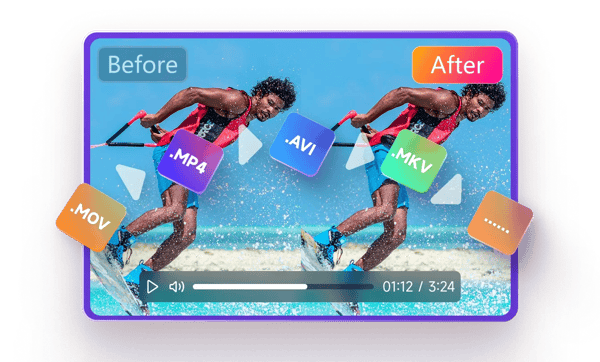
The software utilizes GPU acceleration for enhanced performance and offers distinct AI models optimized for general denoise, animation, and facial detail enhancement. This makes it useful for restoring old footage and improving videos shot in low-light conditions.
Although pricing details are not included in the provided source, HitPaw VikPea delivers specialized video enhancement capabilities with a focus on maintaining video quality and usability across different user levels.
Check Price • hitpaw.com
HitPaw FotorPea Review
HitPaw FotorPea is an AI-powered photo enhancer available for both Windows and Mac that enhances image quality by removing blur, improving detail, and restoring color vibrancy. It supports batch processing for efficient handling of multiple photos.

The software employs advanced AI models for noise reduction and detail preservation, making it suitable for photographers, ecommerce sellers, and casual users who want to enhance low-resolution images quickly. The tool focuses on providing practical editing features without complicated workflows.
Price details are not provided in the sources available. Overall, it offers an accessible solution for improving photo quality with AI-powered capabilities, serving a range of user needs from casual to professional photo enhancement.
Check Price • hitpaw.com
HitPaw Univd Review
HitPaw Univd is a multifunctional video and audio converter that supports fast conversion speeds, reportedly up to 170 times faster than some alternatives. The software offers a user-friendly interface compatible with both Windows and Mac platforms.

It is designed to meet the needs of both professionals and casual users by supporting batch processing and providing reliable output quality. Users can perform format conversion, editing, and compression within a single application.
The tool is suitable for multimedia workflows that require quick format changes and basic editing tasks. Pricing details for HitPaw Univd were not available in the provided source information.
Check Price • hitpaw.com
HitPaw Review
HitPaw provides a suite of AI-powered tools for video, photo, and audio editing designed to simplify media enhancement and editing processes. Its software supports various platforms, including Windows, Mac, iOS, and Android, with features like video upscaling up to 8K resolution, photo enhancement, and real-time AI voice changing.

The platform offers automated AI models for tasks such as noise reduction, detail sharpening, and format conversion, making it suitable for creators, small businesses, and casual users requiring efficient media improvements. Some features depend on system hardware capabilities, and trial versions have usage limitations.
HitPaw operates on a subscription and credit model with different pricing tiers, providing flexibility depending on usage needs. Customer support is available but has received mixed reviews regarding refund handling and response times.
- Free Plan: $0
- Weekly Plan: $9.99
- Monthly Plan: $24.99
- Yearly Plan: $79.99
Check Price • hitpaw.com
HitPaw Pros & Cons
HitPaw offers a comprehensive suite of AI-powered multimedia tools that cater to video, photo, and audio editing needs, supporting high-resolution video up to 8K and enabling efficient batch processing. The software benefits from GPU acceleration for enhanced video quality and upscaling, with intuitive interfaces suitable for both beginners and professionals. Users find the tools particularly useful for restoring old photos and videos, and many have noted responsive customer service as a positive aspect.
However, some users have reported challenges with subscription clarity and obtaining refunds, which can affect the overall experience. Trial versions tend to have limited functionality, potentially leading to misunderstandings about the software's capabilities. There have also been occasional reports of software crashes and license activation issues that users should be aware of before committing to a purchase.
- • Wide range of AI-powered multimedia tools
- • Intuitive user interfaces
- • GPU acceleration for faster processing
- • Batch processing for large projects
- • Supports high resolution up to 8K
- • Responsive customer service
- • Effective restoration of old media
- • Subscription and refund clarity issues
- • Limited functionality in trial versions
- • Occasional software crashes
- • License activation problems
HitPaw vs Competitors
HitPaw offers a comprehensive suite of AI-powered video, photo, and audio tools with user-friendly interfaces and batch processing features, making it suitable for casual creators and small businesses. Competitors often provide more specialized or professional-grade editing capabilities, which may appeal to users seeking advanced functionality.
While HitPaw focuses strongly on AI enhancement and restoration, some competitors may have the edge in pricing transparency and customer support. Users should consider their need for high-end features and reliable post-purchase support when choosing between HitPaw and other options.

- AI multimedia tools
- User-friendly interface
- Batch processing
- Wide feature range

- Specialized editing tools
- Professional-grade features
- Pricing transparency
- Customer support quality
HitPaw Free Trial Information
HitPaw provides free trial versions of its software that enable users to test core features with specific limitations. For instance, AI photo and video enhancers offer preview functions but restrict full exports or processing times unless a paid subscription is obtained. Trial use commonly involves a limited number of images or seconds of video and may require users to register an account.
Users are advised to carefully review trial terms to understand the difference between available features and those offered in paid plans. Some users find the trials useful for evaluation purposes, while others report dissatisfaction due to the credit-based system and the limited range of free trial capabilities for professional use. The scope of free trials may not fully cover the needs of users seeking comprehensive assessments.
HitPaw Refund Policy
We offer a 30-day money-back guarantee. There are no fees if all conditions are met within the guarantee period. Refunds are granted when the product does not perform as described and the customer contacts support within 30 days of purchase.
Refunds are not provided in cases of policy abuse or dissatisfaction due to misunderstanding product capabilities. Approval of refunds is subject to case assessment. Customers are encouraged to review the policy conditions carefully before requesting a refund.
Contact HitPaw Support
You can reach HitPaw customer service for product support and inquiries via email. Additional resources are available to assist you through HitPaw's website.
- Email: [email protected]
- Community forums
- Social media channels: YouTube, Twitter, Instagram, TikTok under HitPawOfficial
For faster assistance, please provide detailed information when contacting support. Responsiveness may vary, so reaching out through the available channels is encouraged.
Where to buy HitPaw?
Users interested in HitPaw can purchase the software officially through the website, where features like account management, direct support access, and clear policies contribute to a reliable buying experience. While the official channel at hitpaw.com ensures access to authentic products, buyers should be aware that marketplace options may vary in reliability and terms. This centralized approach provides standardization, though users outside online purchases might encounter differences in availability or service in other purchasing environments.
Conclusion of HitPaw reviews & ratings
HitPaw holds a relevant place in the media editing category by offering user-friendly tools that focus on video and photo enhancement. Its strengths include intuitive interfaces, a broad selection of AI-powered features, and cross-platform availability, which can be explored further at hitpaw.com. These aspects contribute to its presence in a competitive software market without overwhelming users.
Exploring HitPaw’s offerings can provide insight into practical media enhancement options that suit different needs. Readers interested in a balanced perspective can revisit this page and check out the HitPaw review for a comprehensive look at the tools and user experiences related to the brand.
Editorial notes reflect aggregated buyer feedback and our independent editorial review of publicly available information. They are for informational purposes only and do not constitute endorsements. Purchases are made at your own discretion, and we are not responsible for transactions or outcomes related to this store. Experiences may vary. This content is assisted by AI and reviewed by our editorial team. While we strive for accuracy, AI-supported information may not always be 100% precise, so please verify any critical details.

